

Guide
The Art of AI Image Prompting: Composition, Lighting, Style & Consistency
Learn to direct AI images like a creative director: control framing, light, palette, and consistency using one practical campaign exercise and three adaptable prompts.

Inside the visual language
Same subject. Different story.
Give each visual decision one job. When subject identity stays consistent, changing the frame, light, or atmosphere becomes a meaningful creative choice rather than a random new image.
Art direction is intentional variation.
01
Composition
Guide the eye
02
Lighting
Set the mood
03
Style
Unify the palette
04
Continuity
Keep the identity
Two images can show exactly the same object and tell completely different stories. In one, a cobalt-blue ceramic cup sits in the centre of a quiet frame. In another, it catches a hard stripe of late-afternoon light. In a third, the cup is small, surrounded by generous space for a campaign headline. The subject has not changed. The direction has.
That is the skill this guide develops: using an AI image generator as an art-direction tool, not an adjective machine. The first guide in our series introduced the complete prompt-to-final workflow. Here we slow down and learn the visual choices inside a great prompt: composition, light, colour, style, and continuity across a collection of images.
A better image usually begins with a better decision about what the viewer should notice, feel, and remember.
One object, many possible stories
We will work with one deliberately simple example: a handmade cobalt-blue ceramic coffee cup, with a rounded handle and a slightly irregular glazed rim. There is no logo, no readable text, and no distracting second product. Keeping the object consistent makes the effect of each creative decision easier to see.
Imagine that a small design-led café wants three campaign assets: a calm website hero, an atmospheric social post, and a product-led announcement. It would be wasteful to invent three unrelated worlds. Instead, we can design one visual system and vary its expression for each placement.
The illustrations throughout this guide are editorial diagrams, not benchmark outputs from a particular image model. Their purpose is to make the creative decisions visible; actual generated results will depend on the model, source references, and settings you choose.
Composition: tell the eye where to go
Composition is how visual elements occupy a frame. Before adding texture, camera jargon, or dramatic colour, ask a simpler question: where should the viewer look first? Subject size, placement, directional lines, and empty space all influence the answer.
Centre the subject when stillness matters
Centred framing can feel confident and calm, particularly for a product that needs a simple, recognisable silhouette. Ask for a single cup centred against a quiet background, with a balanced horizon and no competing objects. Symmetry is a choice, not a rule: a small asymmetry in a handmade object can keep an otherwise composed frame human.
Use thirds to create a relationship
Placing the hero near one third of the canvas leaves room for the environment to participate. For our café scene, the cup might sit in the right third while a soft window shadow gives the left side atmosphere. Mention the relationship explicitly rather than relying on the phrase “rule of thirds” alone.
Design negative space for real layouts
Negative space is not wasted space. It is the breathable region that can later hold a headline, a price, a button, or simply a pause. Request the cup on the right with the left half free of important detail. Do not ask the model to invent the final marketing copy inside the photograph; place critical typography in your design or editing workflow afterward.
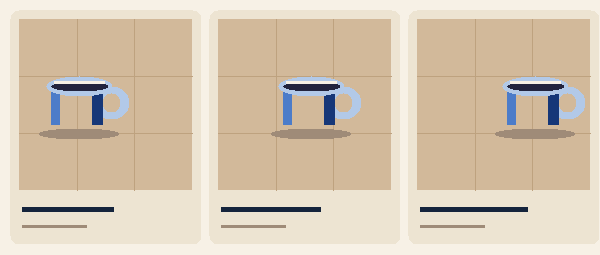
Try this controlled test: Keep the cup, background, and light unchanged. Generate a centred version, a thirds-based version, and a version with empty space on the left. Compare usefulness, not just beauty. A hero image must still work after the site headline is added.
Lighting: give the scene an emotional temperature
Lighting reveals surfaces, creates depth, and changes perceived mood. “Cinematic lighting” is a vague request. A direction such as “soft daylight entering from frame left, a gentle highlight along the glazed rim, and a long diffuse shadow to the right” explains what the image should actually show.
Soft side light: warmth and material
For a welcoming café campaign, ask for broad morning light from a nearby window. A soft edge on the shadow allows the slightly uneven glaze and ceramic texture to remain visible. The image feels approachable because the contrast is controlled.
Overcast diffusion: honest detail
Diffuse light is useful when the product shape and finish matter more than atmosphere. Ask for even illumination, restrained reflections, and an uncluttered neutral background. This is a good direction for a catalogue-like supporting image, though it may not be the most expressive campaign cover.
Rim light: silhouette and drama
For a more graphic social image, move the scene toward blue hour and introduce a narrow edge light. The cup separates from the darker background, while the light picks out its handle and rim. This direction can be striking, but do not let contrast erase important product details.
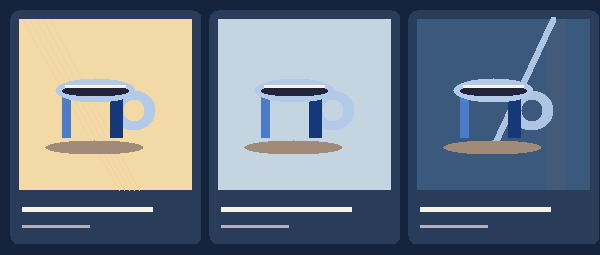
When a result feels flat, inspect the actual highlights and shadows before adding ten more style adjectives. Does the main light have a believable direction? Is the handle readable? Are the reflections consistent with the scene? Correct the evidence you can see.
Colour and style: create a system, not a pile of adjectives
Style becomes more useful when you can describe its ingredients. “Modern premium editorial” could mean a limited palette, tactile materials, confident cropping, calm spacing, and intentional contrast. A string of labels such as modern, dreamy, luxury, cinematic, minimalist and hyperreal can pull the generator in competing directions.
Give your project a small visual vocabulary. For our cup campaign, begin with cobalt blue as the anchor, chalky cream for the environment, warm sand for contrast, and a muted dark ink for shadow. Let the cup remain the strongest saturated shape. Repeating these relationships helps separate a campaign from a collection of unrelated pretty pictures.
Write a miniature style sheet
- Anchor: handmade cobalt-blue ceramic cup, rounded handle, subtly irregular glazed rim.
- Palette: cobalt, chalk, warm sand, dark ink; avoid unrelated neon accents.
- Materials: tactile stone, paper, soft fabric, natural ceramic reflections.
- Camera language: quiet editorial framing, legible silhouette, purposeful crop.
- Lighting language: one primary direction per frame, controlled highlights, believable shadows.
- Exclusions: no extra cups, no text, no fictitious logo, no watermark.
This is a creative-direction sheet, not a promise that all models will perfectly obey every request. It provides an anchor against which outputs can be reviewed and corrected.
Consistency: how to make images feel like one campaign
Consistency has at least three separate dimensions. Subject consistency asks whether the object stays recognisable. World consistency asks whether the materials, colours, and atmosphere belong together. Output consistency asks whether the final assets have compatible crops, contrast, and production quality. A series can fail even when each image looks attractive on its own.
For the cup, write down the non-negotiable facts: cobalt-blue glaze, rounded handle, uneven handmade lip, one cup only. Hold those steady. If the selected model supports reference images, provide a clean image you own or are permitted to use. A reference can help anchor appearance, but the prompt still has to direct the composition and environment. Reference capabilities vary by model, and neither text nor a reference guarantees exact fidelity.
The anchor-and-variation method
- Create or select one strong anchor frame that matches the brief.
- Record its defining attributes in a short visual style sheet.
- Keep the subject description and any suitable reference unchanged.
- Change a single intended variable: composition, light, background, or crop.
- Compare results against the anchor and keep only the variations that belong together.
A familiar mistake is rewriting the entire prompt after a near miss. That destroys the experiment. If the product is right but the background is too crowded, preserve the product direction and change the background instruction. If the light is strong but the handle is wrong, correct the product shape or reference rather than replacing the whole scene.
Three ready-to-adapt art-direction prompts
The following prompts are deliberately related. They share a visual identity while solving different communication tasks. Copy them as starting points, then adapt the object, audience, format, and model-supported options to your project.
01 — A calm website hero
Editorial product photograph of one handmade cobalt-blue ceramic coffee cup, rounded handle and subtly irregular glazed rim, on a pale limestone table. Cup placed in the right third of a wide composition, with generous uncluttered negative space on the left for a website headline. Soft morning window light from frame left, tactile natural surfaces, restrained cobalt, chalk and warm-sand palette, quiet believable reflections. No second cup, no people, no logo, no readable text, no watermark.Why it works: The job, object, placement, and layout requirement are explicit. The background supports the product instead of competing with it.
02 — An atmospheric social frame
One handmade cobalt-blue ceramic coffee cup with the same rounded handle and slightly irregular glazed rim, on a warm stone surface at blue hour. Closer vertical editorial framing, cup occupying the lower centre, deep indigo background, a precise warm rim light outlining the ceramic edge, controlled shadow detail and a small area of breathing room above. Consistent cobalt, chalk and warm-sand art direction. No extra products, no lettering, no logos, no watermark.Why it works: The product identity remains, while the lighting and crop deliberately change the mood. Check the available aspect ratios in your chosen model before generating.
03 — An informative product-detail image
Close editorial product photograph of the same handmade cobalt-blue ceramic coffee cup, prioritising the rounded handle, tactile glaze and subtly uneven rim. Neutral chalk-coloured background, soft diffuse daylight, true-to-material texture, clean silhouette, minimal props and enough separation between cup and background to inspect the form. Keep colour and product details consistent with the campaign reference. No invented branding, no text, no second cup, no watermark.Why it works: The image serves examination rather than atmosphere. It belongs to the same campaign without pretending that every asset should have identical lighting or framing.
Put the method to work in Image Studio
Open Image Studio with your creative brief and one of the example prompts. Select a model based on the capabilities your task needs. Some models offer references, different output counts, aspect ratios, or resolutions; the available controls should follow the model you select. Use Enhance Prompt as an editing aid, then review the result against the style sheet rather than treating an expanded prompt as automatically better.
Choose the intended canvas before you generate. Where supported, add a suitable reference to preserve your subject. Review the credit and OMR estimate for the selected configuration, then make your first purposeful comparison. Keep the promising result in the Asset Library, and use Precision Image Studio for supported finishing tasks such as cropping, resizing, and layout preparation.
Do not use a completed image as proof that every detail is accurate. Review geometry, product identity, text-like artefacts, shadow logic, and whether a design still works at its final display size. If you need exact packaging or brand lettering, place verified design elements in the finishing workflow instead of relying on generated spelling.
Seven common art-direction mistakes
| What went wrong | A more useful correction |
|---|---|
| Everything looks “cinematic” but nothing has a focal point. | Name the hero subject, its placement, and what should remain secondary. |
| The campaign feels like unrelated pictures. | Keep a shared subject description, palette, materials, and reference where supported. |
| The website headline has nowhere to go. | Reserve negative space in a named part of the frame from the beginning. |
| The product changes shape between versions. | Hold non-negotiable features constant, consider a permitted reference, and inspect each output. |
| Lighting instructions conflict. | Choose one dominant source and explain its direction, softness, and intended shadow. |
| The prompt grows longer after every retry. | Change one variable and remove instructions that do not affect the visible result. |
| The image looks good alone but fails in the final layout. | Test real crops, type placement, contrast, and mobile framing before approving. |
Frequently asked questions
Can one prompt produce a consistent visual series?
One carefully structured base prompt helps, but consistency also depends on the model, references, controlled variables, and human review. Treat the series as an art-directed process, not a one-click guarantee.
Is more detailed prompting always better?
No. Detail helps when it resolves ambiguity. Instructions that duplicate or contradict each other can make your direction harder to interpret. Keep the brief specific and the visual hierarchy clear.
Should I put text inside my image prompt?
If accurate copy matters, reserve space for it and add verified typography during layout or editing. Generated lettering may be unreliable and can complicate revision.
How can I tell whether a style is consistent?
Lay the frames next to each other. Check the subject, colour relationships, material treatment, light logic, contrast, and quality at actual usage sizes. A cohesive series should look related without being identical.
Your five-minute creative-direction exercise
Choose one object you can describe precisely. Write down three non-negotiable traits. Create one calm composition, then produce two controlled alternatives: change only the framing in one and only the lighting in the other. Place all three side by side, and write one sentence about what each image communicates. This is how taste becomes a repeatable decision process.
Do not ask only whether the picture is beautiful. Ask whether it belongs to the story you are trying to tell.
When you are ready, take the calm website-hero prompt into Image Studio, adapt it for your own subject, and build a visual system that can grow with your next campaign.
Try this prompt
Editorial product photograph of one handmade cobalt-blue ceramic coffee cup, rounded handle and subtly irregular glazed rim, on a pale limestone table. Cup placed in the right third of a wide composition, with generous uncluttered negative space on the left for a website headline. Soft morning window light from frame left, tactile natural surfaces, restrained cobalt, chalk and warm-sand palette, quiet believable reflections. No second cup, no people, no logo, no readable text, no watermark.
From reading to creating
Your next idea starts here.
Open the workspace, explore your options, and create when you’re ready.
Try the website hero prompt in Image Studio ↗Written by Aiwa Creators
The Aiwa Creators editorial team shares practical workflows for turning ideas into finished media, with a focus on clarity, creative control, and responsible production.